Posts

Understand the relationship between two variable using Correlation

Image
It is important to discover the degree to which variables in your data-set are dependent upon each other. This will help us to prepare the good data-set to meet our machine learning algorithms expectation. Because if the data-set is not good then the performance will degrade. In this tutorial, we are going to discover the correlation statistical information of the relationship of two variable. After completing this tutorial you will know, How to calculate a covariance matrix to summarise the linear relationship between two or more variables How to calculate the Pearson’s correlation coefficient to summarise the linear relationship between two variables. How to calculate the Spearman’s correlation coefficient to summarise the monotonic relationship between two variables. What is correlation ? Variable in the data-set can be related each other in many reasons,For example One variable could cause or depend on the values of another variable One variable could be l...

Time Serious Forecast using Python

Image
Introduction:          Time series are one of the most common things encountered in daily life. For example Financial prices, weather , home energy usage, and even weight are all of data that can be collected at regular intervals. In the series collect the data points at constant interval time which leads the data have the dependency with the time . The Time series has the sudden increase or decrease in certain intervals(Month, day, hour ...). Which will implies the non stationary in the data modelling. The sudden increase we may called like trends , seasonality and so on. Data Analysis in Time series: In python, we have the great library Pandas to handle the time series objects, particularly the datatime64[ns] class which stores time information and allows us to perform some operations really fast. In the below example we are going to use the AirPassanger.csv data set. Initially, we have to load the necessary libraries import pandas as pd i...

React native Undefined is not an object issues

Image
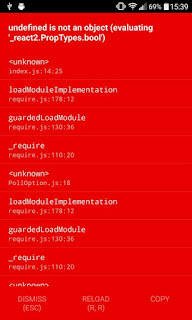
In react native recently many people facing the undefined object issue related to " PropTypes.bool " and " createClass " . This kind of issue ruining the more development time now a days.  Today we are going to look at the exact problem and the solution for this kind of errors Problem Description: As of now we are going to see the  React native Undefined is not an object (evaluating'_react2.default.PropTypes.bool')  . In this issue we cant do the property check for the element using the react native. Screen shot : Root Cause:  The problem arise because of outdated package using in the application. Which  means the react version being in higher/upgraded and the other packages not updated and used old only.  May be the react and react native latest version they deprecated the functionalities which you using in application Solution: The above problem is arrived because of second root cause point. So we have to make sure the up ...

Connect VPN via Python

Here we are going to connect the VPN services through the python. After connect the VPN we can crawl the blocked website and so on. The script going to use the free VPN services provided by VPNGate . The VPN based on the user input countries. Prerequired Open vpn must be available in your system. Use the below command to install open vpn in your linux machine, 1 apt-get install openvpn easy-rsa further more details for the installation , Please follow the link install openvpn Usage Run the script by providing the desired output country like given below, 1 python script.py IN Instead of giving country short name we can use the full name like given below, 1 python script.py India further supported country information list available in that link. Please click me to see the details The connection script is given below, Here we are checked the ip address instance after connected through the vpn. 1 2 3 4 5 6 7 8 9 10 11 12 13 ...

Send Push Notification to iPhone via Python

Image
Notification is the big picture of current day to day applications. So today we are going to look into iPhone push notification. We already seen how to send email notification using python. The to hot topic we are going to deep is How to send push notification to iPhone's . Description     Here we are going to use the Apple push notification service. Through python code we have to send the notification to Apple service with device id . Once we send the notification to apple service, they will take care to deliver this notification to appropriate device. Pre-Requesting  We must enable APNS service. To follow this link to enable the APNS service. APNS will generate the certificate after enable the service. Sample code The below code snapshot will have the sample code for to send push notification to IOS device through the apple sandbox mode in testing purpose, 1 2 3 4 5 6 7 8 9 10 11 12 13 14 15 16 17 18 19 20 21 22 23 24 25 26 27 28 29 30 31 ...